Categories
Using Text Analytics to Tidy a Word Cloud
The trick to a great word cloud is to first tidy up the raw text using automated text analytics.

By Tim Bock
It is common when people create word clouds that they want more control. Limit the word cloud to frequently occurring words. Join together words in phrases. Automatically group together words that have the same meaning. The trick to doing this is to first tidy up the raw text using automated text analytics. Then, create the word cloud using the tidied text.
Why don’t people like Tom Cruise?
In my earlier post, I explained how you can create and interactively modify word clouds in Displayr using an example about why people dislike Tom Cruise. In this post, I use text analytics to create a better word cloud, faster.
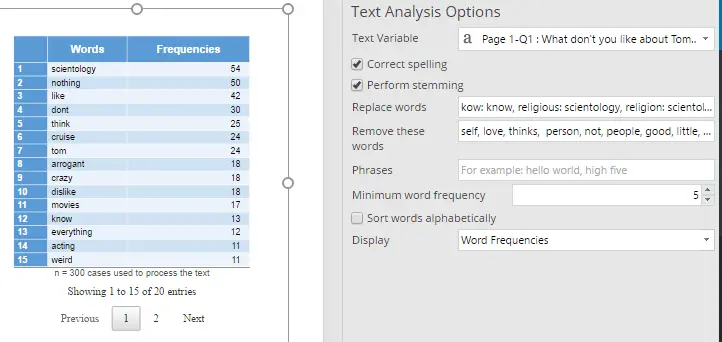
As discussed in this post, text analytics routinely involves a pre-processing phases, where uninteresting and infrequent words are removed, spelling is corrected, words of common route are merged, phases are learned, and infrequent words are removed. This can be automated in Displayr by selecting Insert > More (Analysis) > Text Analysis > Setup Text Analysis, selecting the appropriate options in the object inspector, and then ticking Automatic.
Below, the left side shows the main output of the text analysis setup in Displayr, showing the frequency with which words appear after the text analysis. When this output is selected, as below, you can also see the settings on the right. For example, you can see the Text Variable being analyzed, which words have been removed, and that it is limited to showing words that appear 10 times or more.
When doing this, keep in mind that pairs of words and phrases (e.g., don’t like) are better dealt with interactively in the word clouds, rather than by the text analysis.
Creating a word cloud from the tidied text
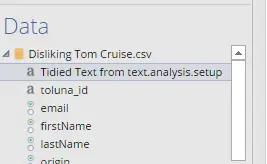
Now that we have tidied the text data, we need to create a new variable in the data file with the tidied text. We need to do this because the word clouds take a variable as an input. To create a variable, select the output, and then select Insert > More (Analysis) > Text Analysis > Techniques > Save Tidied Text, which causes a new variable to appear at the top of the data tree, as shown to the right.
To create a word cloud, we now create a new table by dragging the new variable onto the page, and then select Charts > Word Cloud, adding any phrases that we want to appear (e.g., Tom Cruise). We then get the much tidier word cloud below.
If you want to try it yourself, click here<
Comments
Comments are moderated to ensure respect towards the author and to prevent spam or self-promotion. Your comment may be edited, rejected, or approved based on these criteria. By commenting, you accept these terms and take responsibility for your contributions.
Disclaimer
The views, opinions, data, and methodologies expressed above are those of the contributor(s) and do not necessarily reflect or represent the official policies, positions, or beliefs of Greenbook.
More from Tim Bock
Rotate Your Correspondence Analysis to Better Understand Your Brand Positioning
4 min read
Tim Bock on utilizing correspondence analysis.
Data Visualization for Conjoint Analysis
5 min read
Visualizations can summarize patterns that are commonly hidden in a simulator
What’s Better Than Two Pie Charts?
3 min read
Bad visuals stress the need for charts to be interpretable in seconds
Using “Small Multiples” Visualizations for Big Success
5 min read
Visualizing data can be made easier by utilizing small charts for comparison and analysis
ARTICLES
Top in Research Methodologies
The Career Case for Pro Bono Research
Discover how to choose, scope, and pitch pro bono research projects that build skills, strengthen your resume, and advance your career.
Shawn Keys
Coordinator at KNow Research
Consumer Insights vs. Market Research: What's the Real Difference?
Market research vs. consumer insights: learn the key differences, when to use each, and how both support better business decisions.
Ashley Shedlock
Content Producer at Greenbook
What Are Some Best Practices for Conducting Mixed-Method Marketing Research?
Discover 5 best practices for mixed-method marketing research that combine qualitative and quantitative data for stronger insights.
Ashley Shedlock
Content Producer at Greenbook
The Human in the Room: Why Multilingual Research Needs More Than a Good Translation
7 min read
Discover why multilingual research requires expert bilingual moderators, translation review, and early language planning.
Jill Bishop
Founder & CEO at Multilingual Connections

Sign Up for
Updates
Get content that matters, written by top insights industry experts, delivered right to your inbox.


